

Download Pop Dispatch
One download for Mac, one for Windows, and the server for Linux or a VPS. Sign in, or paste your license key.
No key yet? Start your 30-day free trial, which signs you in when you confirm your email.
Opening a build without a publisher signature
The installers carry no publisher signature yet, so your computer asks you to confirm once. Compare the SHA-256 on the card with the one your computer gives you (the install guide shows how), then follow the steps for your computer.
On a Mac: Open Anyway
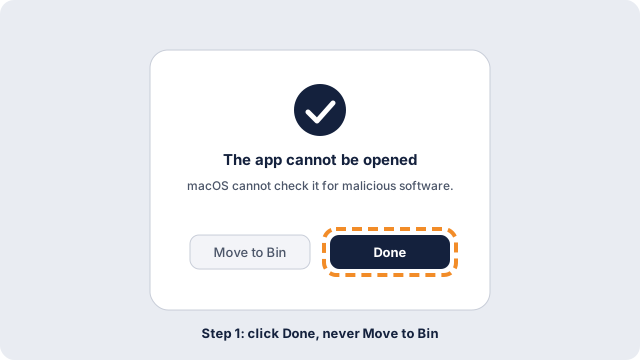
- Open the installer or the app. macOS says it cannot check it for malicious software. Choose Done.
- Open the Apple menu, then System Settings, then Privacy & Security.
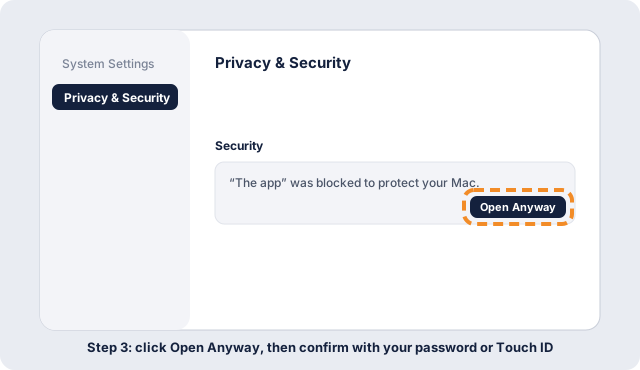
- Scroll to the Security section. Next to the name of the file, click Open Anyway.
- Type your Mac password or use Touch ID, then click Open Anyway once more.
- You do this once per file. After that it opens like any other.
On Windows: More info, then Run anyway
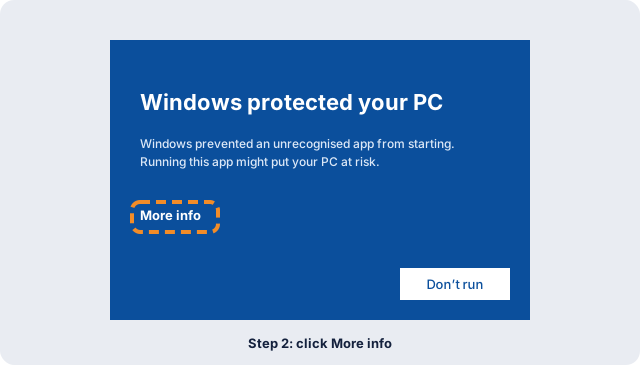
- Open the installer. Windows shows a blue window headed Windows protected your PC.
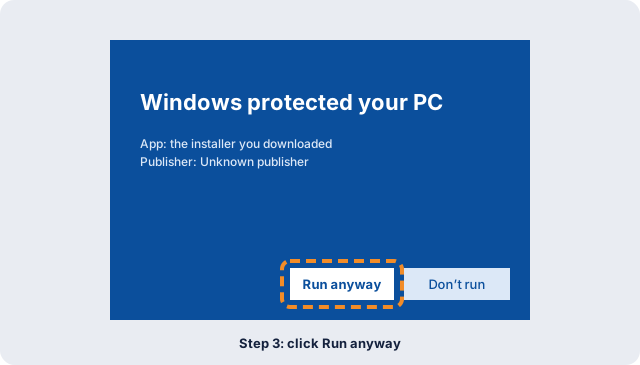
- Click More info. The publisher shows as Unknown publisher.
- Click Run anyway.
- Approve the next prompt with Yes. The installer carries on.
If a trial or license ends
Your records stay readable, exportable and backed up, and nothing is deleted. Adding and changing records stops until you renew. Install guides stay open, and you can export your data at any time. New installers need a running trial or license.
Try it free for 30 days
Every feature is included, and no card is needed to start.
Questions? Contact us